
How to Choose Commercial Building Lighting?
Choosing Commercial Building Lighting is a practical decision, not merely a fixture comparison. Light affects energy use, visual comfort, safety, productivity, and maintenance costs. The International Energy Agency reported that buildings consumed about 30% of global final energy in 2022. Lighting remains a visible part of that challenge. However, efficiency alone does not guarantee a successful project. A bright office can still feel uncomfortable when glare reaches computer screens.
This guide explains how to evaluate Commercial Building Lighting with measurable criteria. These include illuminance, uniformity, color quality, glare control, controls, service life, and total ownership cost. The U.S. Department of Energy’s Energy Savings Forecast of Solid-State Lighting in General Illumination Applications highlights LEDs’ strong efficiency and long-term savings potential. ENERGY STAR guidance also emphasizes certified performance, appropriate controls, and verified product quality. Those details matter in a warehouse, retail space, hospital corridor, or open-plan office.
Start with the building’s real use. A loading bay needs durable fixtures and clear vertical visibility. A meeting room may require dimming, low glare, and accurate skin-tone rendering. Daylight sensors can reduce unnecessary output near windows, but poorly commissioned systems may frustrate occupants. That happens more often than brochures suggest. No checklist is perfect. Existing wiring, ceiling height, cleaning schedules, and local standards can change the best choice. Reliable design therefore combines manufacturer data, recognized standards, site measurements, and feedback from the people using the space every day.
Define Lighting Needs for the Commercial Space
How to Choose Commercial Building Lighting?
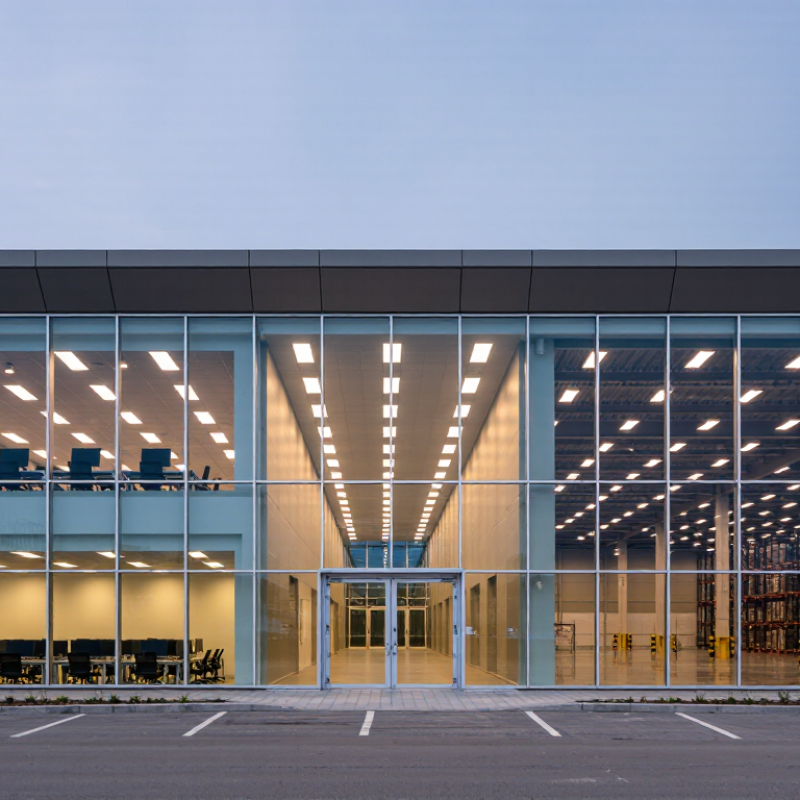
Defining lighting needs starts with the people using the space, not the fixture schedule. Walk through the building during its busiest hours. Observe where employees read, meet, move, and perform detailed tasks. A reception desk needs calm, even light, while a workshop may require stronger task illumination. Check ceiling height, window direction, surface colors, and daily occupancy. A bright room can still feel wrong. Glare on monitors, shadows beneath shelves, or reflections on polished floors can reduce comfort and productivity.
Measure existing illuminance with a calibrated light meter instead of relying only on visual judgment. Compare readings at desks, aisles, counters, and storage areas. Each zone may need a different target level. Select suitable color rendering for merchandise, artwork, medical work, or technical inspection. Neutral white light often supports offices, but preference varies by building use. I have seen teams choose high brightness for a modern appearance, then reduce it after complaints about eye fatigue.
Include controls that respond to daylight, occupancy, and operating hours. Dimming can lower energy use, but poorly configured sensors may leave workers in sudden darkness. Test a sample area before wider installation. Review maintenance access, cleaning conditions, lamp replacement, and emergency lighting requirements with a qualified professional. Keep records of measurements and user feedback. The first plan will rarely be perfect. Recheck the space after furniture, partitions, and seasonal daylight changes are in place.
How to Choose Commercial Building Lighting? - Define Lighting Needs for the Commercial Space
| Commercial Space | Primary Activities | Recommended Illuminance | Typical Color Temperature | Recommended Color Rendering | Glare Guidance | Control Strategy | Key Design Considerations |
|---|---|---|---|---|---|---|---|
| Open-Plan Office | Computer work, reading, meetings, and circulation | 300–500 lux | 3500–4000 K | CRI ≥ 80; CRI ≥ 90 for detailed visual tasks | Target UGR ≤ 19 where occupants use computer screens | Occupancy sensors, daylight dimming, and task-level adjustment | Use evenly distributed indirect or low-glare luminaires to reduce screen reflections and visual fatigue. |
| Private Office | Focused desk work, video calls, and document review | 300–500 lux | 3500–4000 K | CRI ≥ 80 | Low glare is preferred, especially near monitors and windows | Individual dimming, occupancy sensing, and window-side daylight control | Combine ambient lighting with adjustable task lighting so users can personalize brightness. |
| Conference Room | Presentations, collaboration, video conferencing, and meetings | 300–500 lux | 3500–4000 K | CRI ≥ 80; CRI ≥ 90 for accurate skin tones on camera | Target UGR ≤ 19 and avoid direct reflections on displays | Scene controls for presentation, discussion, video, and cleaning modes | Use separately controlled lighting zones for the table, presenter wall, and display surfaces. |
| Reception and Lobby | Wayfinding, visitor welcome, check-in, and brand-neutral visual presentation | 200–300 lux ambient; 300–500 lux at desks | 3000–4000 K | CRI ≥ 80; CRI ≥ 90 for artwork or material displays | Control contrast and avoid glare at reception counters | Time scheduling, occupancy sensing, and daylight response | Layer general, accent, and vertical lighting to improve orientation and make the space feel welcoming. |
| Retail Sales Area | Product browsing, comparison, customer movement, and merchandising | 300–750 lux | 3000–4000 K | CRI ≥ 90 for merchandise color accuracy | Use controlled beam angles to limit reflected glare and hot spots | Flexible zoning, scheduling, occupancy sensing, and daylight dimming | Provide higher accent levels on displays than in general circulation areas while maintaining comfortable contrast. |
| Classroom and Training Room | Reading, writing, instruction, presentations, and group work | 300–500 lux | 3500–5000 K | CRI ≥ 80 | Target UGR ≤ 19 where screen-based learning is common | Separate controls for desks, teaching wall, and presentation screen | Minimize shadows on writing surfaces and provide independent control near projection or display areas. |
| Corridors and Circulation Areas | Walking, wayfinding, access, and transition between spaces | 100–200 lux | 3000–4000 K | CRI ≥ 80 | Maintain comfortable brightness transitions at doors and intersections | Occupancy sensors with low-level standby dimming | Prioritize uniformity, clear vertical visibility, and safe transitions between bright and darker areas. |
| Stairwells | Vertical circulation, emergency movement, and changes in level | 100–200 lux | 3000–4000 K | CRI ≥ 80 | Limit harsh shadows on steps and landings | Occupancy sensors, automatic scheduling, and emergency-lighting integration | Provide continuous visual guidance on treads, landings, handrails, and changes in direction. |
| Warehouse and Storage Area | Picking, shelving, inventory checks, loading, and equipment movement | 100–300 lux; up to 500 lux for detailed work | 4000–5000 K | CRI ≥ 80 | Control glare from high-bay fixtures and reflective packaging | Occupancy or aisle sensors, daylight harvesting, and scheduled setback | Use aisle-oriented distribution and adequate vertical illumination to improve label and rack visibility. |
| Parking Garage | Vehicle movement, pedestrian safety, parking, and security observation | 50–100 lux in general areas; higher at entrances and ramps | 4000–5000 K | CRI ≥ 70; higher CRI may improve recognition and security perception | Reduce flicker and glare for drivers and pedestrians | Motion detection, daylight response, and multi-level nighttime dimming | Use durable, moisture-resistant equipment and maintain smooth brightness transitions between daylight and interior zones. |
| Restroom | Personal care, cleaning, hygiene, and safe movement | 200–300 lux; 300–500 lux at mirrors | 3000–4000 K | CRI ≥ 80; CRI ≥ 90 is preferable at mirrors | Diffuse light around mirrors to avoid strong facial shadows | Occupancy sensing, vacancy switching, and timed dimming | Use moisture-suitable fixtures and provide balanced vertical illumination around mirrors and wash areas. |
| Industrial Work Area | Assembly, inspection, machinery operation, and production tasks | 300–750 lux depending on task detail | 4000–5000 K | CRI ≥ 80; CRI ≥ 90 for color inspection | Control glare, veiling reflections, and stroboscopic effects | Task zoning, occupancy sensing, daylight dimming, and maintenance alerts | Select lighting according to task precision, equipment height, dust or moisture exposure, and required visual uniformity. |
Related Posts
-
How to Choose Commercial Lighting for Your Business
-
How to Choose Commercial Lighting Solutions for Business
-
Exploring Global Opportunities: The Surge of Foreign Buyers at the 137th Canton Fair for Design Lighting Innovation
-

China's Resilient Growth in Best General Lighting Amidst US China Tariff Challenges
-
Unmatched Quality of Best Commercial Warehouse Lighting Made in China for Global Buyers
-

How to Choose the Right Light Source for Your Home and Business Needs